How to Make Money on TikTok LIVE With Free Interactive Games (No Camera Needed)
You can host a TikTok LIVE that people genuinely want to join, no camera needed. Free interactive games for PC turn comments, likes and TikTok LIVE gifts into big on-screen moments, so you can run a lively stream with your voice and your ideas, without showing your face.
Here are three free Windows games that work with TikTok LIVE Studio, a simple setup you can finish in an afternoon, and show ideas that keep viewers playing. As your community grows, TikTok LIVE gifts from viewers can help you earn extra income from streams you actually enjoy hosting.
Three free TikTok LIVE games for PC
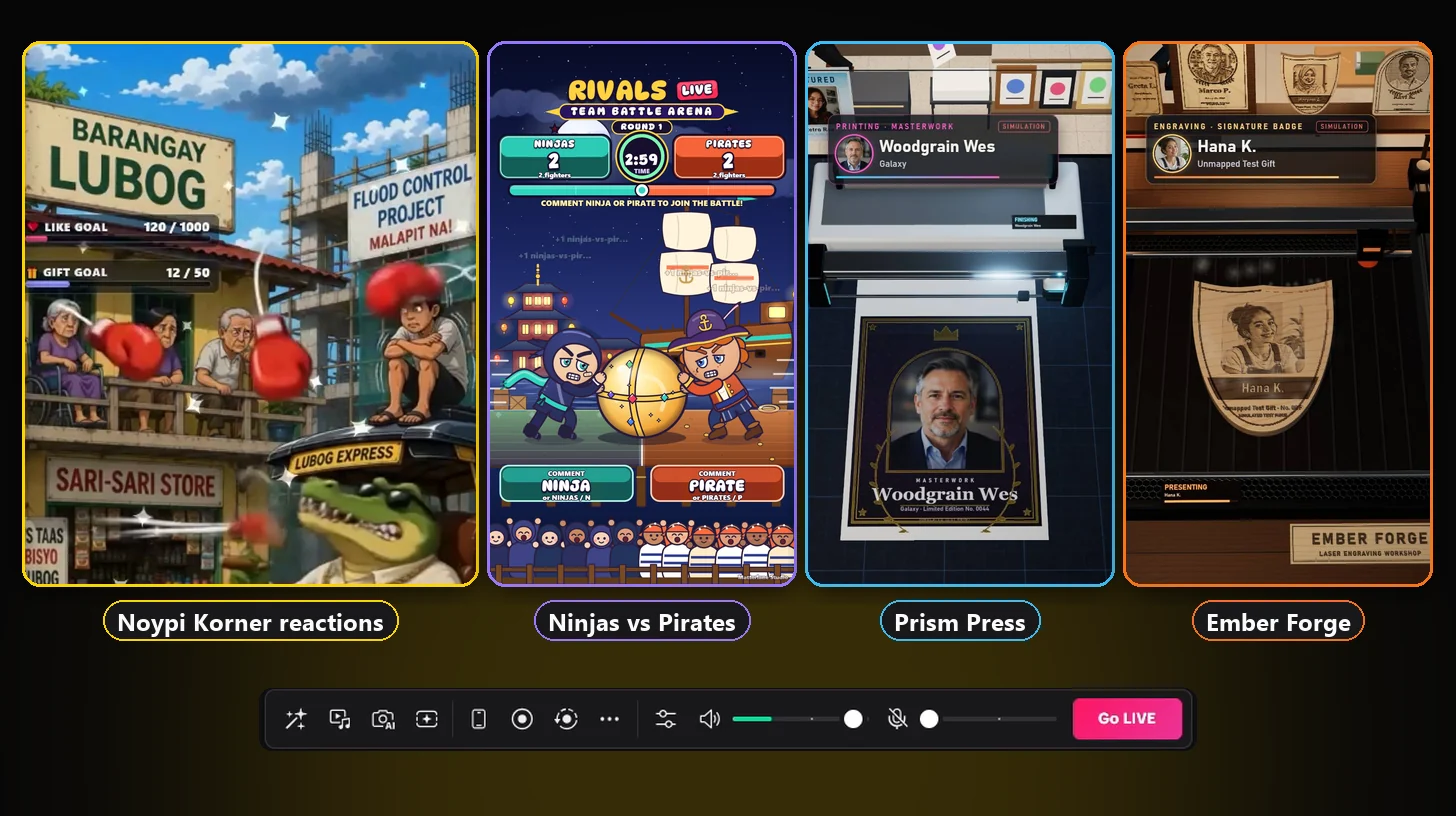
- Noypi Korner: gifts and likes play your own funny clips, weather effects and a rising flood challenge.
- RIVALS LIVE: Team Battle Arena: viewers comment to join a team and push a giant ball in a live tug of war.
- LASER Conveyor: Avatar Virtual Printer: viewers watch their profile pictures get printed or laser engraved on screen.
All three are free to download, activate and use on a Windows 10 or 11 PC. Viewers join for free, and gifts add the biggest moments.
Build your own reaction show with Noypi Korner
Noypi Korner, a free TikTok LIVE interactive game for Windows, plays your own reaction clips when viewers send gifts or tap likes. Think of it as a creative engine rather than a fixed game: you choose the scene, the characters and the punchlines, and your audience decides when they happen.
Any short clip you can export as an MP4 or WebM video can go into a reaction slot, and a video loop or an image can be your background. Your reactions can be skits you film yourself, an episodic story set in your neighborhood, inside jokes your regulars love, a spooky Halloween set, a Christmas special or a birthday surprise for a loyal viewer. Clips you create with an AI video tool work too, once you export them as a video file. Just use media you made or have the rights to share.
Here is what your viewers can trigger:
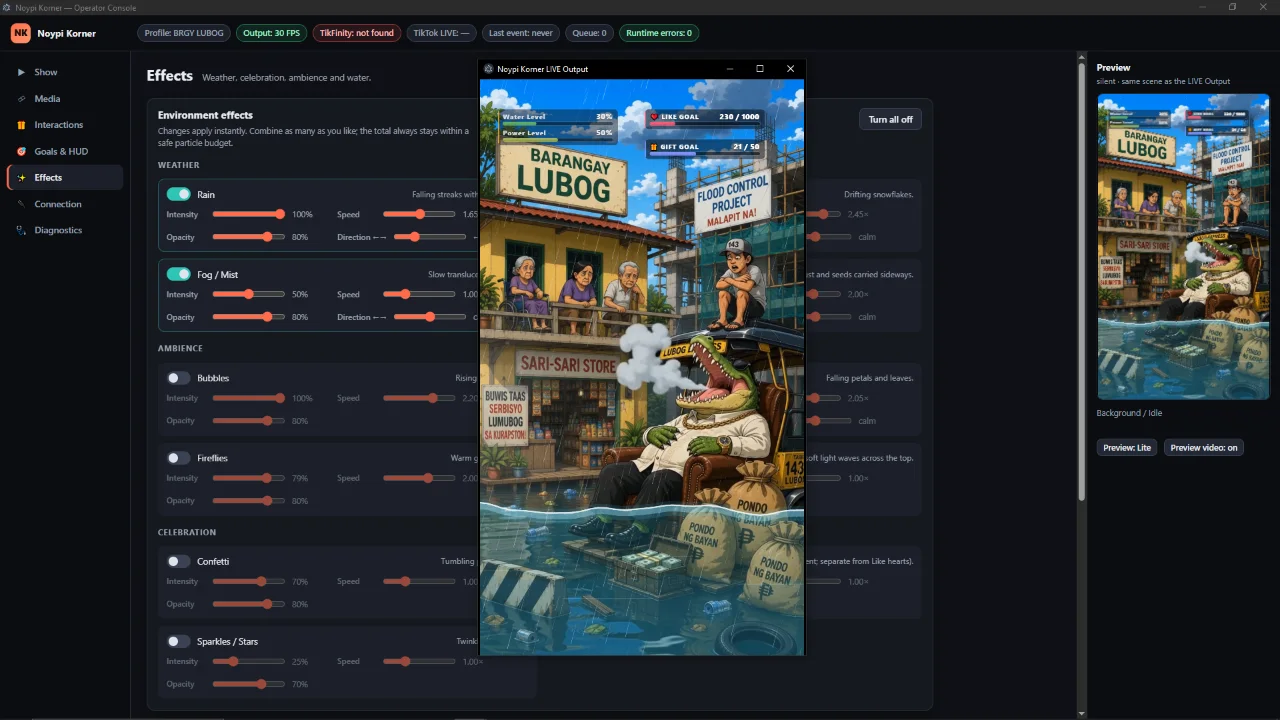
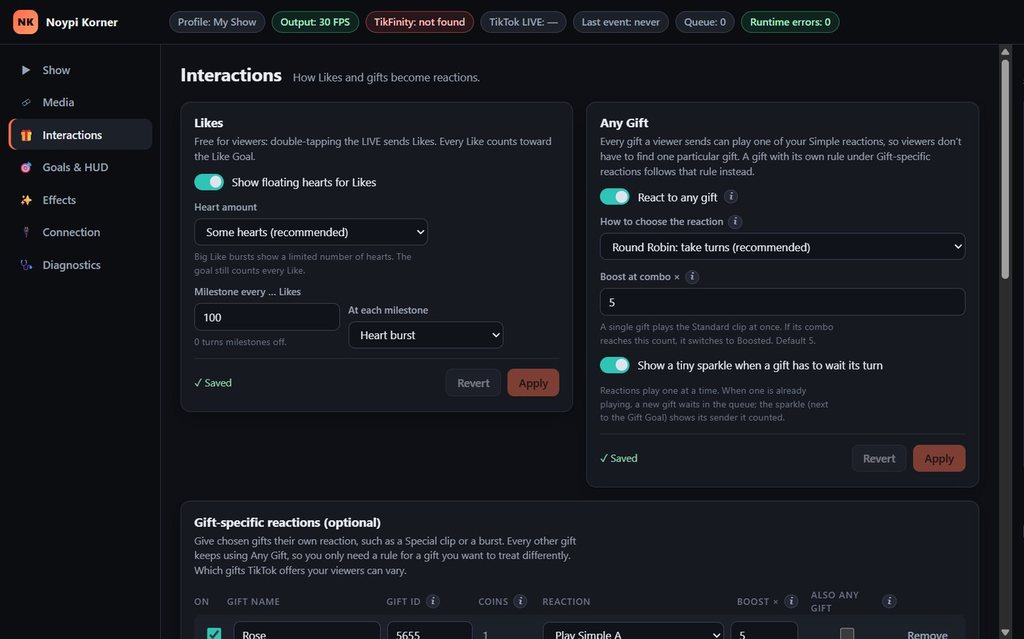
- Any gift or a favorite gift. Let every gift play the next reaction in rotation, or give specific gifts their own clip.
- Likes. Free taps send floating hearts, hit milestones and fill an on-screen Like Goal.
- Goals and meters. A Gift Goal and live meters show the room how close the next big moment is.
- The Water Rising Challenge. The water climbs on its own while gifts push it back down. If it reaches the line, your Endgame reaction plays, and nothing else can trigger it.
- Mood effects. Rain, fog, snow, bubbles, fireflies, confetti and sparkles change the scene with one click, even mid-LIVE.
Try this: run a weekly neighborhood sitcom where each gift moves the story forward. Ask chat what should happen next, film the best idea as a new clip and premiere it in next week’s LIVE. Get Noypi Korner free for Windows.
Run comment-powered team battles with RIVALS LIVE: Team Battle Arena
Nothing wakes up a quiet chat like picking a side. In RIVALS LIVE: Team Battle Arena, a free comment-powered TikTok LIVE battle game, viewers join a team by typing its command, and every valid comment pushes a giant ball toward the other side. Your followers stay because their team needs them, and newcomers can jump in with a single word.
Three rivalries are ready to play, each with its own characters, stage, music and team commands:
- Boys vs Girls in the Neon Arena: comment BOYS or GIRLS.
- Santa vs Frost Imp in Twinkle Hollow: comment SANTA or FROST.
- Ninjas vs Pirates at Moonlit Harbor: comment NINJA or PIRATE.
Likes help the side a viewer picked, and gifts add a bigger boost, with caps so one large gift cannot end a round on its own. The clock waits for the first team comment, holds the round when chat goes quiet, names the winning team’s MVP and starts the rematch automatically.
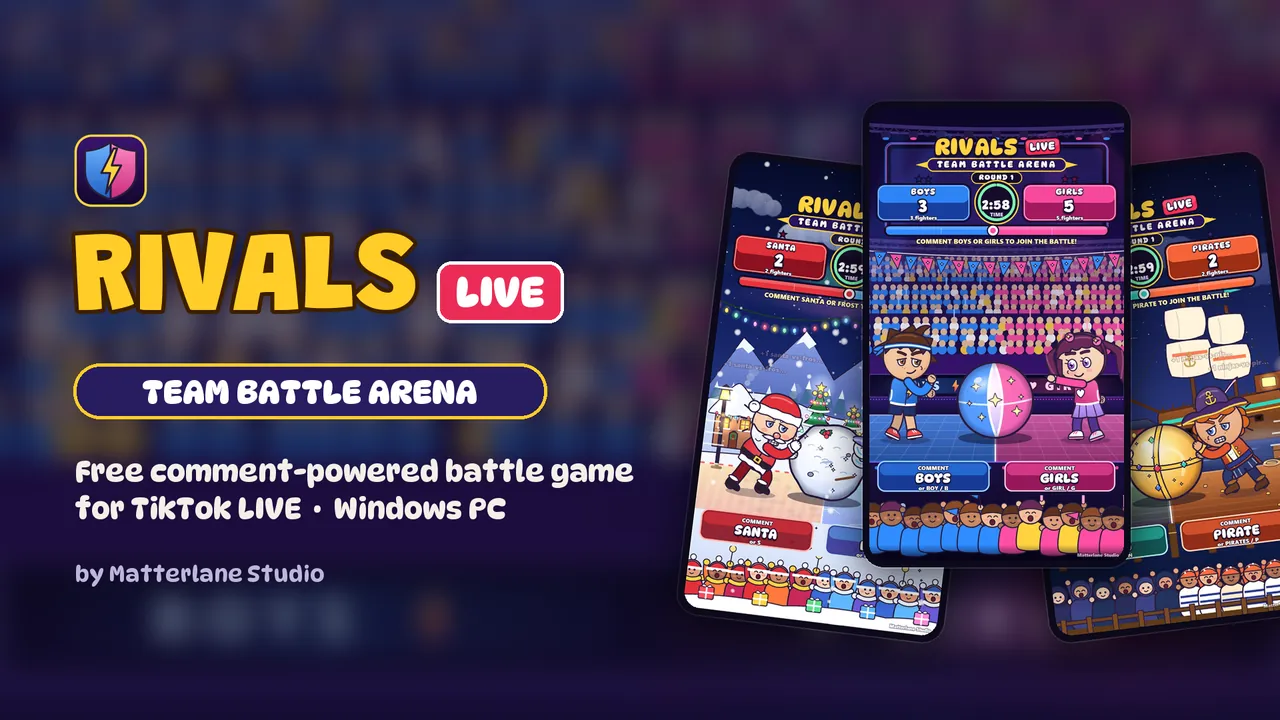
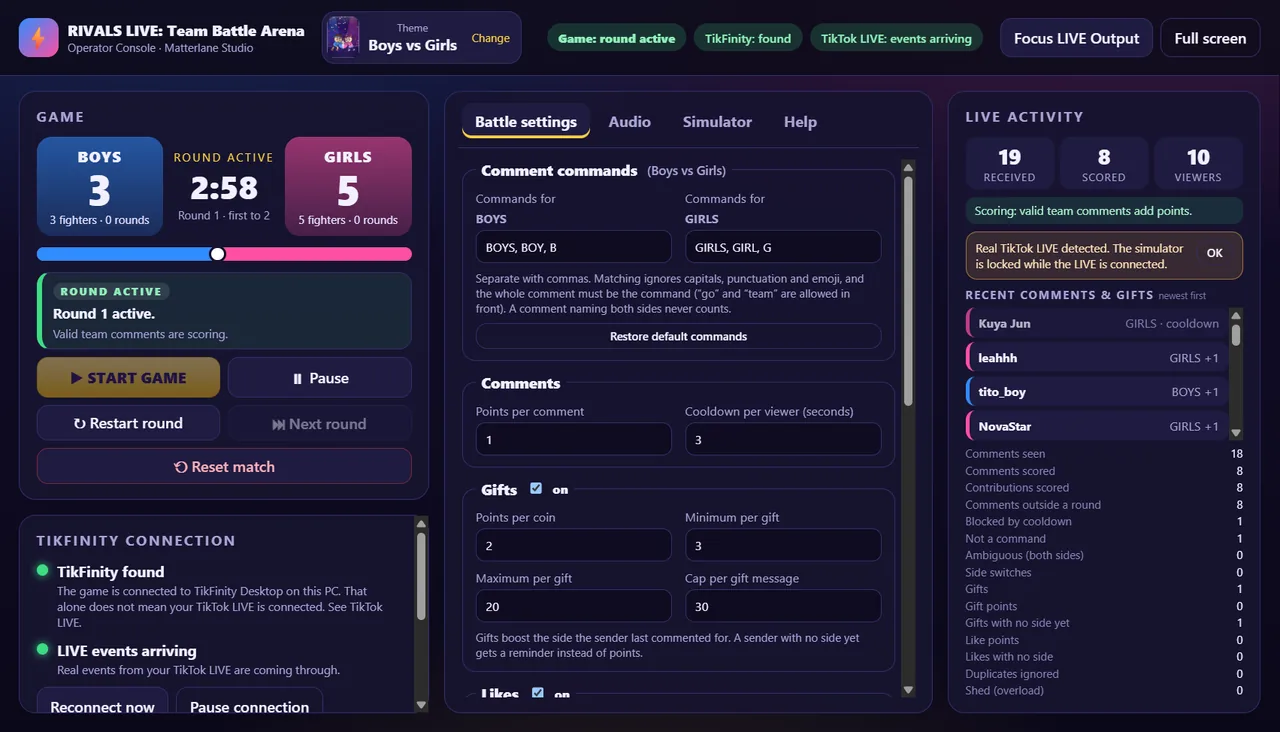
Format ideas: a best-of-five Ninjas vs Pirates night with a rematch for the losing side, a December Santa vs Frost Imp tournament, a shoutout for every round’s MVP, or a weekly rivalry your regulars plan around. Set your own on-screen title and round length to fit the show. Get RIVALS LIVE: Team Battle Arena free for Windows.
Put viewers on screen with LASER Conveyor: Avatar Virtual Printer
People love seeing themselves on stream. LASER Conveyor: Avatar Virtual Printer, a free TikTok LIVE virtual printer for PC, turns viewer activity into artwork made from their TikTok profile pictures and display names, all on screen. There is no physical printer, laser or other equipment to buy.
- Prism Press is a gallery print studio. Free portraits print in a few seconds, up to three side by side on one sheet, and gifts unlock framed, foil and Masterwork prints.
- Ember Forge is a laser engraving workshop. A simulated laser burns each portrait into light wood, from a maple medallion up to an oak plaque or an heirloom frame, and finished pieces fill the wall.
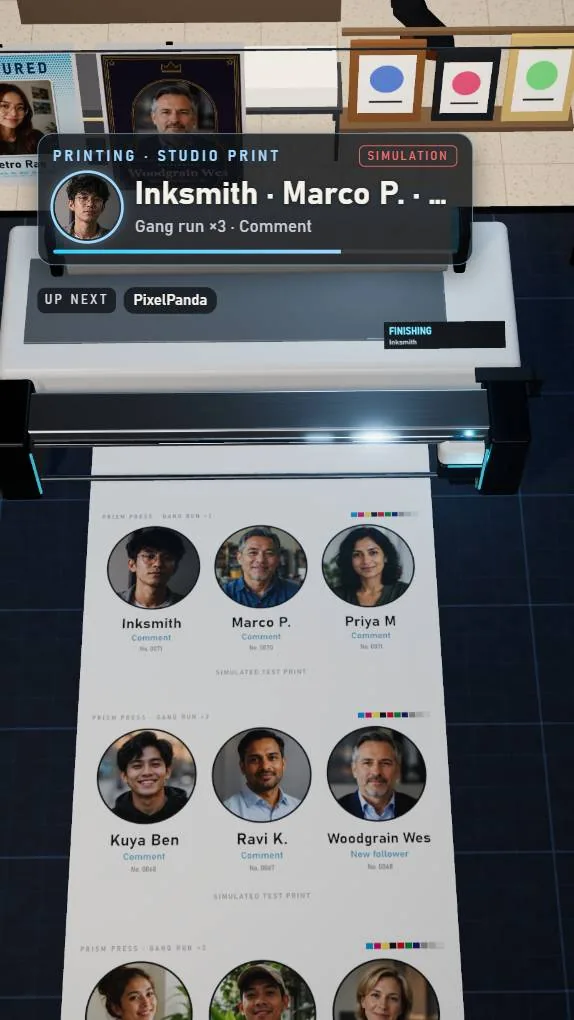
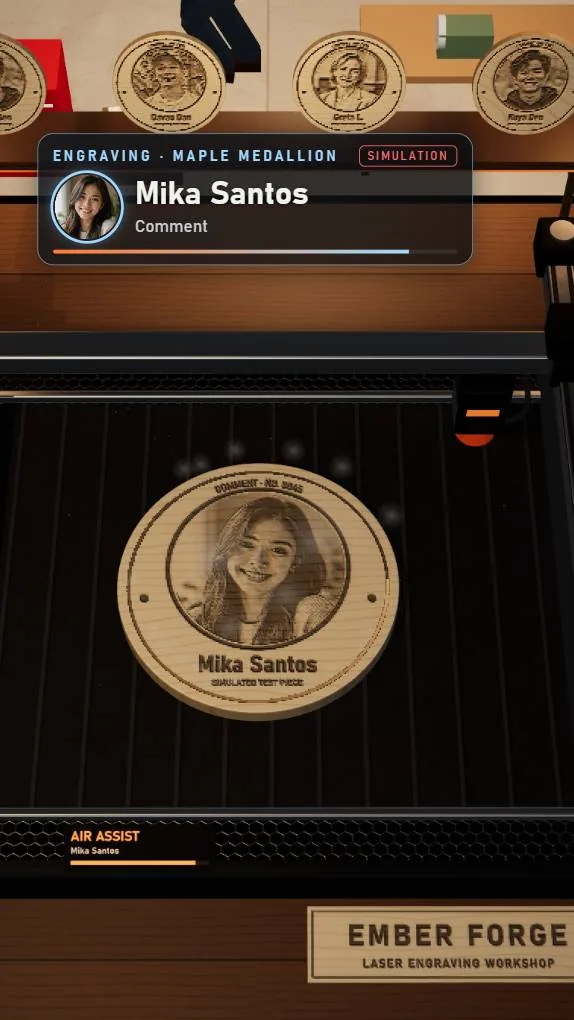
Viewers can earn a free portrait with a comment (any comment, or a keyword you choose), a follow, a share or by reaching a like threshold you set. Each viewer can have one free artwork waiting, followed by a short cooldown. Gifts are a separate reward track: map a gift to a bigger piece, or let unmapped gifts pick a reward by coin value. Where TikTok offers Viewer Wishes on your account, you can map the same gifts in the app.
Show ideas: a relaxing late-night portrait studio with soft music, a high-energy follower party where every new follow gets printed, a gallery night in the Daylight Loft, or a cozy woodshop story in the Timber Barn. You can switch between Prism Press and Ember Forge during a LIVE, and the queue carries over. Get LASER Conveyor: Avatar Virtual Printer free for Windows.
How to start a free TikTok LIVE game on Windows
You need a Windows 10 or 11 (64-bit) PC you already own, a stable internet connection and a TikTok account that can go LIVE. There is no paid software subscription in this setup: TikTok LIVE Studio is free from TikTok, TikFinity describes its LIVE tools as free to use, and all three games are free.
- Check that you can go LIVE. In the TikTok app, tap the + button and look for LIVE. TikTok requires creators to be at least 18 and sets other requirements that can vary by region.
- Install TikTok LIVE Studio from TikTok’s download page and sign in with the account you stream from. Access depends on your account.
- Install TikFinity Desktop from the official TikFinity page on the same PC. It passes your LIVE’s comments, likes, follows and gifts to the game.
- Download a game from its official page and get a free activation code: join the Matterlane Studio Discord, open the #activation-code channel and use the /activate command. Each page walks you through it, explains what Windows may show the first time you open a new app and lists a SHA-256 checksum so you can confirm your download.
- Add the game to your scene. In a portrait LIVE Studio scene, add a Window Capture of the game’s LIVE Output window, plus your microphone. A camera is optional.
- Rehearse offline. Each game includes a simulator, so you can test reactions, battles or prints with pretend viewers before anyone is watching.
- Go LIVE and host. Start your LIVE, connect TikFinity, then explain the rules in the first minute: how to join for free and what gifts do.
Your voice is what makes a camera-free LIVE work. Stay at the controls, greet viewers by name and keep the game moving: TikTok’s LIVE Monetization Guidelines say passive, unattended or static streams may not be eligible for monetization.
Stream ideas that keep viewers playing
- Give your LIVE a storyline. A running joke, a villain viewers love to beat or a season that ends with a finale gives people a reason to come back.
- Change the theme with the calendar. Spooky clips in October, Santa vs Frost Imp in December and a celebration set for every follower milestone.
- Set like goals out loud. “At 1,000 likes, I switch off the rain” turns free taps into a team effort.
- Make gift moments feel like fireworks. Thank every gift by name, play a big reaction and keep the game fun for people who never send one.
- Call people in. Greet new viewers, read comments aloud and give the room jobs, like voting on the next theme.
- Layer in overlays and sound. TikFinity’s goals and overlays can sit beside the game window, and Viberary’s free music for livestreams sets the mood. Use only music and clips you have the rights to broadcast.
- Keep reaction clips platform-friendly. In a Viberary test LIVE, a cartoon cigar in one reaction clip was enough for TikTok to show viewers a “consuming substances” notice, so leave smoking and alcohol out of your clips.
- Stream on a schedule. Regular days and times help viewers find you again, and TikTok also counts how often you go LIVE.
How TikTok LIVE gifts can support creators
During a LIVE, viewers can buy Coins and send virtual Gifts to cheer you on, and those gifts show up as Diamonds on your account. Under TikTok’s Rewards Policy, eligible creators aged 18 or older may receive LIVE rewards that TikTok calculates from Diamonds and other factors, such as viewer engagement, new followers during your LIVE, how long and how often you go LIVE, and the quality of your content.
That is why interactive games fit so well: they give viewers more reasons to stay, comment, follow and celebrate with you. TikTok does not publish a fixed amount per gift or per Diamond, so the earnings screens in your app are the place to see real numbers.
Gifts vs TikTok Shop commissions
TikTok Shop is a separate way to earn: approved affiliates receive a commission when viewers buy products through their videos or LIVEs, as the TikTok Shop affiliate program explains. Gifts and games do not create Shop commissions, but the audience you build with games can support affiliate content later. Viberary’s guide to high paying affiliate programs shows how commission terms compare.
Compare the three free TikTok LIVE games
| What you get | Noypi Korner | RIVALS LIVE: Team Battle Arena | LASER Conveyor: Avatar Virtual Printer |
|---|---|---|---|
| Creator outcome | A personal comedy or story show in your own style | A competitive room where chat drives every round | A warm, personal stream where viewers become the art |
| What viewers see | Your clips, backgrounds, effects, goals and the flood challenge | Two animated teams pushing a giant ball across the arena | Their profile pictures printed on paper or engraved in wood |
| Creative flexibility | Highest: your own media, gift mapping, effects and goals | Three themes, your own title, round length and sound levels | Two attractions, three studios and three workshops, reward and queue rules |
| Gifting effects | Gifts play reactions and push the water down | Gifts boost the viewer’s team, with caps | Gifts unlock larger prints and engravings |
| Best LIVE format | Skits, storytelling, holiday and event specials | Tournaments, rivalry nights and rematches | Relaxing gallery nights or high-energy follower parties |
| Required setup | Windows 10 or 11 PC (64-bit), TikTok LIVE Studio, TikFinity Desktop and a free activation code from Discord | ||
| Free way to take part | Likes (hearts, milestones, Like Goal) | Comments with a team command | Comments, follows, shares or a like threshold |
TikTok LIVE games FAQ
Can I go LIVE on TikTok without showing my face?
Yes. With TikTok LIVE Studio you can stream a game window and your voice instead of a camera. Stay actively involved by talking, reacting and running the game, because TikTok says passive or unattended streams may not be eligible for monetization.
Are these TikTok LIVE games really free?
Yes. Noypi Korner, RIVALS LIVE: Team Battle Arena and LASER Conveyor: Avatar Virtual Printer are free to download, activate and use. TikTok LIVE Studio is free from TikTok, and TikFinity describes its LIVE tools as free. You only need the Windows PC and internet you already have, plus a Discord account for activation codes.
How do TikTok LIVE gifts turn into money?
Gifts become Diamonds on your account. If your account is eligible, TikTok may pay LIVE rewards based on Diamonds and other factors such as engagement and new followers. There is no fixed rate per gift, so your app’s earnings screens are the best guide.
Do viewers have to pay to play?
No. Every game has a free way to join: likes in Noypi Korner, team comments in RIVALS LIVE: Team Battle Arena, and comments, follows or shares in LASER Conveyor: Avatar Virtual Printer. Gifts simply make bigger things happen.
Do I need a gaming PC?
No special gaming rig is required. The games run on Windows 10 or 11 (64-bit) with working graphics acceleration, and LASER Conveyor: Avatar Virtual Printer has lighter quality settings for slower PCs. Rehearse in the simulator first to check how your PC handles it.
Can I play these games on my phone?
The games run on a Windows PC, not on Android, iPhone or Mac. Your viewers still watch and play from their phones in the TikTok app.
Which game should I start with?
Pick Noypi Korner if you love making clips and telling stories, RIVALS LIVE: Team Battle Arena if your chat is lively and competitive, and LASER Conveyor: Avatar Virtual Printer if you want a relaxed stream that celebrates each viewer. You can try all three and rotate them through the week.
Realistic expectations
Treat your first streams as practice and audience building: games make a LIVE more fun to join, and consistent hosting is what grows a community. LIVE access, gifting and rewards depend on TikTok’s eligibility rules and policies in your region, and income is never guaranteed, so check your own app before you plan around earnings. Then pick one game, rehearse it tonight and host your first game LIVE this week.
References: TikTok Virtual Items Policy, Rewards Policy and LIVE Monetization Guidelines; TikTok Shop affiliate program; TikFinity; TikTok LIVE Studio. Information checked November 10, 2026.